MITM is a feature
On the open internet, terminating someone's TLS in the middle is an attack. Inside a trust domain we own end to end, it is what keeps a real Nix install command from failing because an upstream had a bad day.
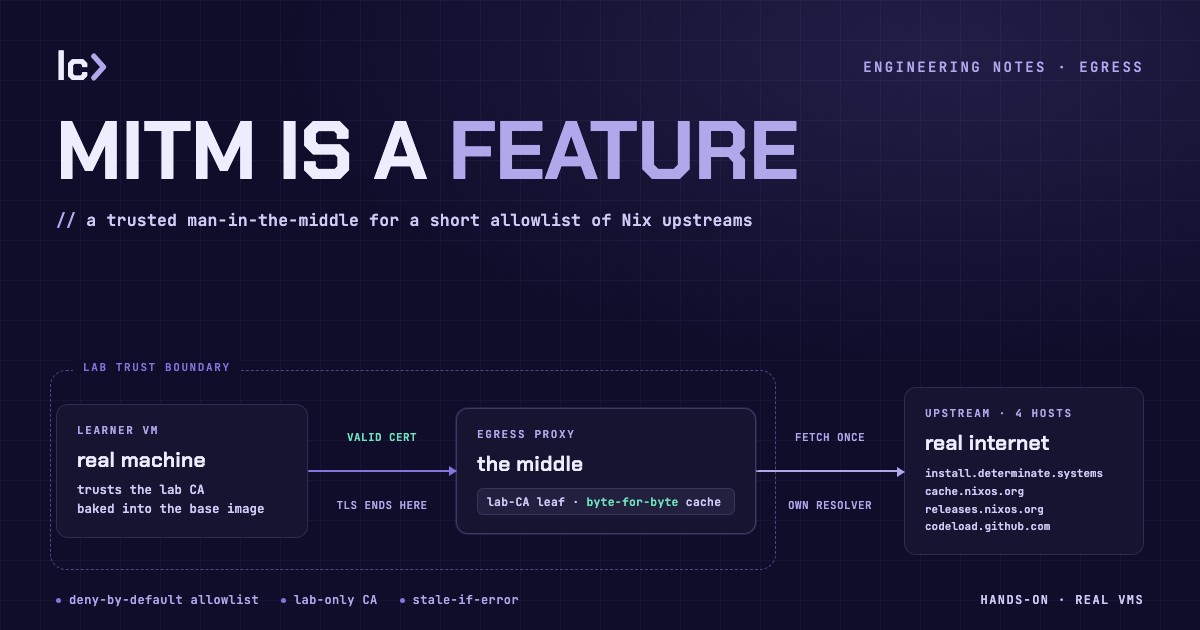
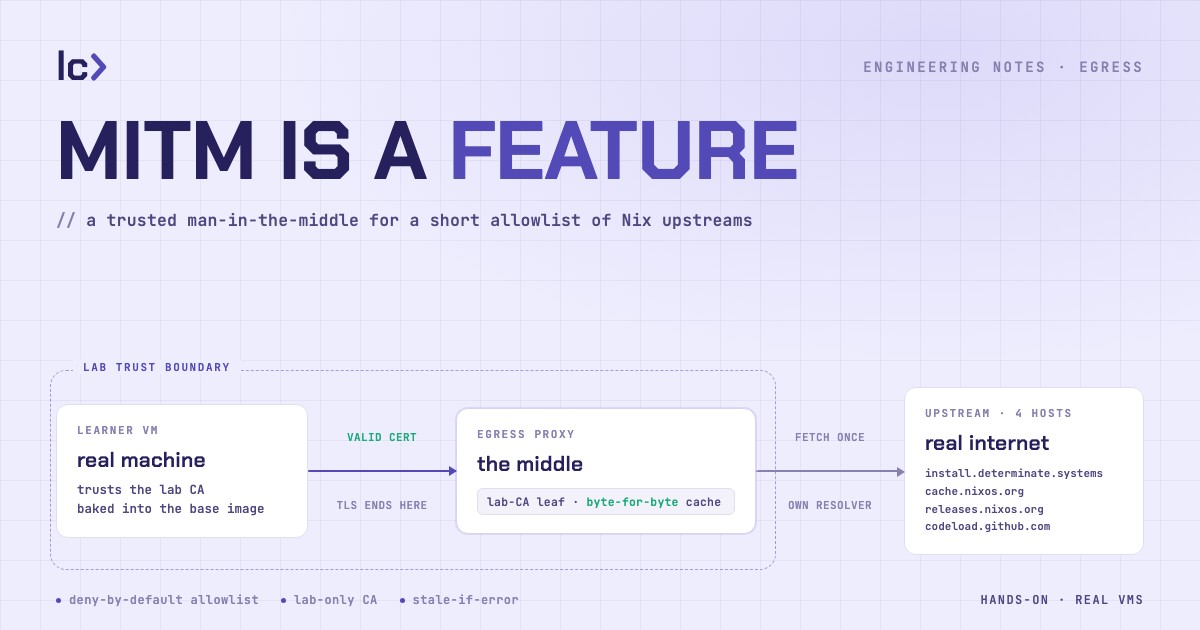
A LabCraft Nix lab starts with the command the Nix ecosystem actually ships:
curl https://install.determinate.systems/nix | sh -s -- install --no-confirm
Not a mirror. Not a rewritten URL. Not a screenshot of a terminal with the
output already filled in. The learner runs the real installer and watches it
create /nix, stand up the daemon and the build-user pool, write the shell
hooks, and leave the receipt that later drives a clean uninstall — because
inspecting what an installer does to a machine is the lesson, and you cannot
inspect a fake one.
That command should teach all of that. It should not teach that a CDN had a slow afternoon. But the moment a lab runs the real command, its reliability becomes a function of a stranger's uptime: the installer host has a bad morning, the binary cache rate-limits a fleet of cold machines, a source tarball crawls — and a learner who did everything right watches their first Nix lesson fail for a reason that has nothing to do with Nix.
So we sit in the middle of it.
Steering a hostname without touching the command
The obvious fixes all change what the learner sees. An HTTPS_PROXY export is a
visible knob they would never set on their own machine. A rewritten installer
URL teaches a LabCraft-shaped command instead of the real one. A cache wired
into Nix's own configuration changes the very configuration the course is trying
to teach. Every one of them narrows the lesson.
So the redirection happens one layer below the command, in DNS.
Inside the lab, the VM's DNS resolver is ours. For the small set of upstream names the Nix lesson needs — the installer, the binary cache, and the sources a build pulls — it answers with the address of a caching proxy on the lab network instead of the real public address. Everything else resolves normally and points at the real internet. The learner's command is untouched; the packet just arrives somewhere we chose.
This is split-horizon DNS: the same hostname resolves to different addresses depending on who is asking. Hold that thought — it comes back when we explain why the proxy doesn't trip over its own redirection.
How the interception actually works
The VM opens a normal TLS connection to cache.nixos.org. It has no idea
anything is unusual, and by the end of the handshake it still won't.
The first thing a TLS client sends is the server name it wants — the SNI field — in the clear, before any encryption is negotiated. That is the hook: the proxy reads the requested hostname straight off the handshake, checks it against the allowlist, and for an allowed name presents a certificate for that exact hostname.
A browser on your laptop would reject that certificate instantly — it was not issued by an authority the laptop trusts. The lab VM accepts it, because its trust store was built to trust LabCraft's lab authority, and the certificate is signed by that authority and carries the right hostname. The chain of trust checks out, so the handshake completes: from the guest's point of view it is talking to the real host over a valid, trusted connection — which, as far as it can prove, it is.
Now the proxy holds the decrypted request. There is a precise, unfriendly name for a box that presents a valid certificate for a hostname it does not own and reads the plaintext inside: a man-in-the-middle. On the open internet, that is an attack, and every layer of the web's trust machinery exists to stop it.
We built one on purpose.
Why this one is not an attack
The technique is not magically safer because we gave it a friendlier goal. What makes it safe is that the trust it depends on is trust we placed, inside a boundary we own, and nowhere else. Four things hold that line.
The lab VM image trusts LabCraft's lab authority, and nothing outside the lab does. That trust is baked into the image — never installed on your laptop, never handed to your browser, never a general web-trust anchor. The signing authority itself is not inside the VM or the proxy. Leave the lab and that trust is gone; the same proxy would draw a certificate error.
When the proxy needs a certificate for an allowlisted host, it asks that authority for a short-lived one, issued only for the names on the list. The proxy never holds a signing key of its own.
Nothing outside the allowlist is ever intercepted. A hostname has to be present in every layer — the DNS steering, the proxy's own allow set, and the signing authority's policy — before the path works at all. Ask the proxy to speak for any other name and the handshake aborts before it presents a certificate. Your traffic to everywhere else resolves and connects exactly as it would without us.
And the proxy never loops back on itself. Remember the split horizon: the VM's resolver steers the allowlisted names to the proxy, but the proxy's own resolver does not. Same name, two resolution contexts — so when the proxy needs the real upstream, it reaches the real one, never itself.
A few questions a technical reader will have. Can it speak for arbitrary sites? No — only the allowlisted names are steered, and nothing off the lab trusts the authority anyway. Could a learner who roots their VM mint certificates for other sites? No — the VM holds only the public trust anchor, which can verify lab-signed certificates but not issue them; the signing key is never there. Is unrelated traffic read? No — only the allowlisted names are terminated; everything else is untouched.
Inside the boundary, interception is just caching
Once the trust is contained, terminating TLS stops being interception and becomes plumbing. The proxy holds the request, and now it can answer from a local store instead of the public internet.
The first VM that runs the installer pulls each artifact once. Every VM after it is served the same bytes from local cache. Concurrent misses for the same object collapse into a single upstream fetch, so a hundred cold machines booting at once do not become a hundred requests upstream. And when an upstream is briefly down, a still-valid cached copy is served through a grace window instead of failing the learner — an outage out there becomes a non-event in here.
Nix is what keeps this honest. It does not trust bytes; it verifies them.
Binary-cache objects are content-addressed — the hash is the identity — so each
artifact is immutable, safe to keep, and has to come back byte-for-byte. If the
proxy rewrote a single byte of a NAR or a .narinfo, or stored a half-finished
download as though it were complete, the guest's own signature and hash checks
would reject it and the install would fail louder than any outage. So the cache
preserves responses exactly, and is conservative about what it stores at all:
only cacheable reads, nothing carrying credentials, and revalidation when
possible. The learner gets a valid certificate for the real hostname and the
exact bytes the real upstream would have sent. The man-in-the-middle is
invisible to the lesson — which is the entire point. It is there to keep the
lesson real, not to fake it.
Caching is curriculum infrastructure
It is tempting to file this under performance — a cache that stops cold VMs from hammering the same upstreams. That is true, and it is not the point.
The point is what the course is for. The Nix path opens by having the learner install Nix on a real machine, so they can watch the store, the daemon, the build users, and the shell hooks appear — and later tear them down with the receipt the installer left behind. Preinstalling Nix would delete the very state the lesson is about. The real command has to run.
That is where reliability turns into judgment rather than uptime. When something fails inside a LabCraft lab, the failure should be one the learner can inspect and repair: a bad shell hook, a missing dependency, a path that was not what they assumed. Those are the course. A third-party outage is not — it can be completely real and still teach nothing about Nix. The proxy keeps the real command, the real hostname, the VM's normal certificate checks inside the lab trust boundary, and Nix's own integrity checks in the loop, and quietly removes the one failure that was never the lesson.
The learner runs exactly what they would run on their own machine, and their progress does not ride on a stranger's bad day. Start the Nix course and install Nix on a real VM — the boring, dependable way.